Disclaimer: These are my notes from the UKeIG Digital Communications Course in December 2014, to attend which I received the LIR Bursary 2014. They are my own personal notes, any errors are mine, and do no reflect in anyway on UKeIG, Ned Potter or LIR.

This was the first delivery of the revamped 'Digital Marketing Toolkit' course. It was renamed 'Digital Communication', but still delivered by Ned Potter under the aegis of UkeIG. This new course has more of an emphasis on communicating digitally with your community of library users.
The agenda for the day looked like this:
- Online publishing, images
- QR Codes
- Geolocation
- Mobile Apps
- Video
- Blogs , Tumbler
- Twitter, Pinterest.
In the general introduction to the course we were encouraged to focus on the tool with which your library users are most likely to interact. In other words you don't have to do everything, or even use every new tool, rather be user community focused. In reality the tools that people use are often not the 'best' ones, but the ones that they respond best to. If you are going to start using additional tools, ask yourself whether it solves an existing problem, before you commit any resources to doing so.
Ned then explained that there are two problems with library communications.
Off the Peg V Tailored Messages |
Most Advertising doesn't work |
| Mass communication becomes white noise | Counter with a practical division of your target audience into smaller groups |
| It is very difficult to make a person change behaviour, as a single piece of advertising does not make people act | Use communications to create awareness by building 'ambient awareness' over time. |
When you are undertaking a project, or trying to communicate with your audience, make a 'Marketing Plan' even if it is just for two weeks on a particular theme.
People should see your message more than once.
Online Publishing: Issuu & Scribd.
Posting externally on sites like Issuu and Scribd enhances the discoverability of your document, and consequently your library. Issuu and Scribd results are placed higher in search engine results, improving dicoverability, as let's face it not everyone begins their search at the library's web site. Using tools like Issuu and Scribd can lead to reputational gain, as they have higher rankings in search results due to the quality of the SEO on their sites.
Check your institutional policy and that none of your content is sensitive in nature before uploading.
Check your institutional policy and that none of your content is sensitive in nature before uploading.
'Host externally, Embed locally'
Libraries face a challenge when it comes to having websites 'usable' and addressing accessibility etc. in addition to user resistance to opening pdfs. Issuu and Scribd provide a work around for some of these issues, and create attractive looking documents which can be embedded into web pages and social media sites with little difficulty. Consider converting guides, brochures and workbooks and embedding them with a preview of the content showing.
Issuu http://issuu.com/

Save powerpoint or word documents as pdfs and import them into Issuu. Make sure you use document structuring (headings etc.) high contrast colours, table labeling, and alternative text for images in any file that will be converted / uploaded to increase it's accessibility. More people will look at the words if they are on Issuu.
When designing document which will be presented digitally, use font size 14 (no cursive fonts), eliminate the print border / margin from the document, and don't put too much on the page, to eliminate the need to zoom in to be able to read the page content.
Consider using this method for Information Literacy training session notes.
Always make a pdf available of an Issuu document.
Enable the document to be donwloaded (allows for printing) and add audio where appropriate.
Always make a pdf available of an Issuu document.
Enable the document to be donwloaded (allows for printing) and add audio where appropriate.
Scribd https://www.scribd.com/

Scribd has more accessibility features. It can also be embedded. However it is not as visually appealing as the way that Issuu embeds.
Images


Use the right image, an image appropriate to the message you are sending. Sources for free to download, royalty free images include:
- Morguefile : http://www.morguefile.com/archive
- Pixabay : http://pixabay.com/en/photos/?image_type=photo&order=best
- Flickr : https://www.flickr.com/search/advanced/
Search flickr by license to (creative commons), modification allowed.
Morguefile is a good source for reference type images, which are free and require no attribution.
Make sure that you are in the free images part of pixabay by clicking on the free images link at the bottom of the page.
Fonts

Using non-standard fonts draws the eye to the content. Make sure any font that you use looks professional.
Source for fonts:
Font Squirrel : http://www.fontsquirrel.com/
QR Codes

QR Codes have had mixed success in library settings. Question whether your library community is one that will engage with QR codes before you invest time and effort into them. Remember that the user needs to have a smart phone and a a qr scanning app to engage with your QR code content. This may be a barrier to use as the user has to open an app to get access to your information. Don't link to short easy to remember web addresses; reward your users for taking the time to scan you code by linking to more complex URL's.
Advantages
The major advantage of QR codes is that you can use a free QR code generating web site and input a complex URL making the technology more complex then you think.
Disadvantages
- Smartphone needed
- QR Code Scanner / reader app needed
- Some people don't like QR codes (resistance)
- Small risk of fraud in commercial settings
Possible uses for QR codes:
- ILL form links
- Link to OPEN Link Resolver
- Link to proxied resources
- Go straight to a location on Google Maps
- Log onto WiFi
- Direct link to an e-book
- When print is not available
- Create a dummy physical item
- Link to guidelines
- Copyright etc.
- Direct download of apps
- Link to YouTube Videos
- Use them in mysterious ways
- Post the QR code with no explanation
Place QR codes at point of need and include a URL for those with no QR scanning app.
Bit.ly can customize URL's, and tracks the number of clicks on a link.
If you are going to use QR codes, put up an explicit explanation of what they are and how they work - show the benefit to the user.
There is also an image version of the QR code, where the Image is scanned and links to a web resource.
Source for QR Code generation:
- Snap: http://www.snap.vu/
- Create a free account
- Keeps usage statistics
- Can send e-mail alerts when code scanned.
- Download in jpeg or png format.
Geolocation

Smart phones know exactly where that are at any given moment. Your facilities and buildings may be geo tagged whether you have done it or not. It is better to be in control of what is posted and where. Check Foursquare for your location(s), and claim them from Foursquare if you do not already have control of your entry. If you have no entry create one. At a minimum take ownership of your geolocation, and control the basic information about you. Once that's done link your's foursquare into your social media accounts, create tips, upload images and control comments. Basically you want to personalize it, and use tags like free WiFi in your tips.
FourSquare has changed this year, there are now two different elements to it:
- Swarm (businesses can still reward people for checking in at locations)
- Swarm, the new app from Foursquare, is the fastest way to keep up and meet up with your friends. With Swarm, you can easily see who’s out nearby and who wants to hang out later.
- From itunes.com
- Local Search / Personal Search
- Foursquare is now working to have its app understand people's tastes and cater to their interests, it's what the company calls "personalized local search."
- from cnet.com
The Internet of Things
Object are being connected via the internet via a unique identifier. Libraries are used to working with this concept (self service, RFID etc.). This is leading to the development of Smart homes etc.

Beacons are an example. They are low energy bluetooth devices - can be the size of a smart phone. Other applications include: Smart Watches ie Jaw bone. Commercial beacons can be purchased and made part of an app., users can then interact with the physical item.
Library applications include locating items from a booklist; the smart phone guides the user to the item on the library shelf via the internet of things because it can locate the rfid tag in the book.
- Self guided library tours using QR codes
- Enriched special collections leveraging digitized items.
- Availability of facilities (rooms, pc's printers etc. )
Source:
Augmented Reality
This application can be triggered by images. For example: Aurasma acts on a specific image, BUT users have to have the Aurasma app installed for it to work.
Sources:

an Augmented Reality tool for shelf-reading and inventory management in libraries

- Overlay video tutorials with additional content
- Self Service
- On screen prompts for those using catalogue search. (Overlay with useful information)
- Guide users to a destination
Mobile web sites and apps
New mobile phones tend to be smartphones. Consequently people expect to be able to access library services via these devices. Options available to libraries include:
- Social Media account
- Lib Guides
- Blogs
- Apps
- Adaptive Design
- Responsive Design (ITT Dublin Library has this solution in place)
- I mentioned that http://mattkersley.com/responsive/ was a useful resource for evaluating how mobile device friendly your web site is.
Refer to the works of Aaron Tay for more information (http://musingsaboutlibrarianship.blogspot.ie/)
Mobile device users (this includes smartphones, android tablets, ipads chrome books etc.) want to be able to access 'normal' information such as news, library catalgoue/s, but also information of immediate interest such as: pc availablity, room availabilty, course reading lists, video of IL sessions.
If you have or are considering a 'library app' consider whether it should be part of the overall University App, integrated with your VLE (Moodle, Blackboard etc.) App, or stand alone.
Irrespective of where it resides you still have to market the App, and remember when doing so that word of mouth works best.
If you opt for an adaptive deign web site remember you are committing to maintaining two versions of the same web site.
Responsive design is the gold standard for mobile devices (not just smart phones), and works across a wide range of devices. It leverages html5 and css3 to deliver a web site scaled to the device accessing the site.
Other tools

- Audioboom https://audioboom.com > The audioBoom platform allows ordinary users to bring content to millions of listeners worldwide via their web site, embeddable players, mobile applications, Facebook & Twitter, basically providing on demand audio to download.

- Podcasts: https://www.apple.com/ie/itunes/podcasts/ Users can actively subscribe to a channel (great for promoting special collection or archives) (This refers to podcasts on the Apple itunes platform)

- Prezi: https://prezi.com/ (Open an educational account) Prezi is cloud-based, meaning you can present from your browser, desktop, iPad, or iPhone and always have the latest version of your work at your fingertips. Create or edit on the go, then auto-sync across all your devices with ease. Presentations can be embedded locally
- Upload preexisting documents (save word or powerpoint as a pdf), and each pdf page will be identified as a seperate item within the prezi presentation.
- For example upload a document with the floor plans of your library on seperate pages and you can create an interactive map of your library.
- Don't go mad with it, use it to make something small and interactive.

- Slideshare: http://www.slideshare.net/ Offers users the ability to upload and share publicly or privately PowerPoint presentations, Word documents and Adobe PDF Portfolios. Presentations can them be embedded locally.

- Bitly: https://bitly.com/ Bitly allows you to easily save and share your favorite links from around the web. You can also share this Bitlink with others via Facebook, Twitter or Email, copy the Bitlink provided for easy sharing, Add notes to the Bitly link, Add the Bitly link to a bundle . All the links you save will be accessible at any time in your Bitmarks list. You can also track the stats for any Bitly link.
- The value of having a bit.ly link is that this shortened link is easy for people to remember.
Video
It is easier to generate Video recordings now, than it was a few years ago. In line with this change is the growing expectation that users have of being able to learn by video.
Sources
YouTube is where most people go to view video content. It has a community which takes action, and in this way is less limiting than other hosting services such as Vimeo. It is not brandable, but does have a huge reach. Verify your account so that you can access additional services such as direct uploading from a phone. Check that your settings allow users to view content from a mobile device. Assume that your users are going to be using your video content from a mobile device and serve them by filming up close, and ensure that the content is understandable without audio. (Have information appear on a banner under the video content.)Ensure advertising does not appear, nor related videos at the end of yours.
When recording a video, hit the ground running, as your viewer will be gone in 5 seconds if you don't catch their attention. Keep it short, as in less then 2 minutes. Don't be too flashy or move around the screen too fast. You can link from anywhere into any frame in your video.
 Use Youtube to create a playlist for the topics you want to present to users. For example:
- Library information
- Information technology information
- Tutorials
Subscribers on YouTube should not be equated with use. You might have 69 subscribers but +51,000 minutes of video watched. When looking at your Youtube usage, observe when people switch off/exit your videos.
 Use services such as Video Scribe (small fee) to generate white board videos, on topics such as 'What is a database?'. White board videos have been found to improve recall. Their fun style puts people in a good mood making them more receptive to your information.
Library applications:
- Virtual library tour.
- White board videos
- Adobe Voice for iPad

Works with iPad only: records voice and adds images and text to build a presentation. It's not possible to add video content to a Voice project, even though the final output is a video. There is no YouTube version of it.
Screen Capture
- Camtasia:

Is a powerful, easy-to-use screen recorder - use it to create screen capture videos. It records your screen movements and actions, or you can import video from a camera or other source. Customize and edit content on both and share with viewers on nearly any device.
- Tinytake:
- Is a free screen capture & video recording software for Microsoft Windows. With TinyTake, you can capture images and videos of your computer screen, add comments and share them with others in minutes. TinyTake is built by MangoApps and is available for free.

Hosting: Recommendation
Put your videos up on YouTube, and the one's you want to embed back into your web site on Vimeo as well using the Vimeo version to embed your content.
- Vimeo: Provides a high quality service hosting service, which provides statistics, can be locked down / password protected, however there are limits to what you can do with the free version.
- Provides a brandable embedded solution to video hosting.
Blogs, Tumbler etc.
Blogs
Remember the visitor does not need to know that the web page they are visiting is a blog.
Blogs are a great way to get information out.
Google are keen on web sites that regularly update - this is good for SEO (Search Engine Optimization)
Blogs are mobile device optomized, easy to use and free.
You get a URL for everything posted, and can ask for comments, allow tweets etc.
Use a blog to draw together all your other social media account, curate tweets, embed YouTube videos.
Most importantly write posts that are interesting and fun.
POINT: Embedding multimedia content does not equate to dumbing down your site.
Google Analytics can be used with your blog to see what content is being accessed. Visual.ly is an infographic site that will send you regular spreadsheets of your google analytics.
Tumblr: micro blogging

Tumblr sits between twitter and blog in 'post' size, but is much more visual. Content usualy has a lot of pictures and animated gifs. It is easy to 'reblog'. Tumblr users are mostly under 35. Use it to showcase what is going on, on a visual basis. Tumblr users interact with each other and share information, but to do this they must have their own account. It is possible to program the Tumblr AI, but only the first 5 tags are indexed. Notes and Reblogs help get you noticed. Try to tap into MEME's.
.jpg) |
| Meme Example |
Library application:
Twitter & Pinterest
This section focused on Twitter and Pinterest.
Assess the impact of your social media actions by looking at retweets, favourties, likes and subscribers.
Link all your accounts to enable maximum engagement. Remember social media facilitates conversation. Social Media can be used to boost the library's reputation / profile. Once you get initial feedback, channel it into your other social media presences - embed it. If you have an international audience, be aware that you need to post appropriately to your entire audience, to avoid causing offence.
Run a campaign on one aspect of your service.
Library application:
- Run a 3 question survey - embedded in social media, before a marketing drive.
- Have your marketing drive.
- Re-run the survey 2 months later to see if there is a change in knowledge / behaviour.
189 million FaceBook users interact with it via mobile devices only.
 The observation was made that even though people are being forced to create Google+ accounts, and it's creating fact sign up headlines, this does not mean that people are actually engaging with the service. Remember to put your effort where your audience / users are. plus.google.com
On a side note, when I checked my plus account today - which is basically left wander free with a tie to my blogs, I had 40,000 views... So like with Four Square above, it is probably something I should be more aware of.

Instagram is taking over, especially with teens. It's visual emphasis is more appealing, and people interact more via Instagram as a result. http://instagram.com/

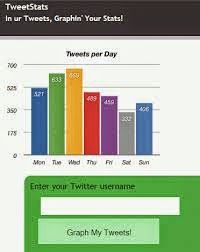 Twitter is the most useful tool for libraries. AS 1:10 followers will see your tweet post it a few times. Look at tweetstats.com or analytics.twitter.com to see what's happening with your account, and compare statistics.
Use Storify to curate content in relation to an event or timeline. Search in the storify interface for facebook, twitter and other web content replated to your event, click and drag them into the interface in the order you want, publish and embed in you web site. storify.com (quick gathering of my posts this semester https://storify.com/AnLeabharlannai/an-leabharlannai-2014

Pinterest.
Pin photos and videos, arranged and organized by theme. Put your own stuff up for external use.
Pin your perfect library. (Let others pin to this board)
It gives pins and boards a unique URL.
Final Observations
This was a very useful day with lots of ideas as to how to utilize Digital Marketing Tools in a library setting. I was glad that I was familiar with most of the tools in advance, even if I hadn't a personal account with them, as I was able to pick up on the additional tips and tricks as they arose, rather then spend the day trying to get my head around the basics of all the different services and tools mentioned.


